Schema-less Custom Fields
MailerBit custom fields let you attach any data to any contact — tax amounts, ROI projections, attendance rates, account numbers — without a fixed schema. Each field becomes a merge tag in your email templates, replaced with the recipient's unique value at send time.
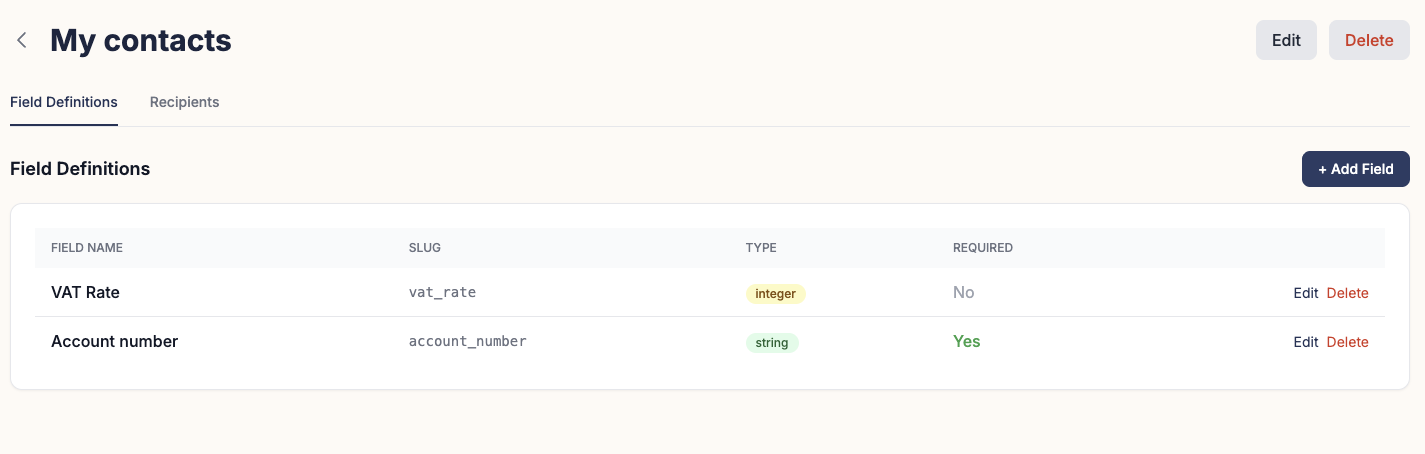
What Are Custom Fields and Why Does Schema-less Matter?
Traditional email tools let you personalize a first name or a city — and that's it. MailerBit takes a different approach. Custom fields are per-contact data variables you define yourself, with no fixed structure imposed by the platform. Need a field called VAT Amount? Add it. Need Investment ROI, Attendance Rate, or Policy Number? Add those too. You are not constrained by a predefined schema — the data model flexes to match your business, not the other way around.
This matters because real-world personalisation goes far beyond names. Accounting firms need to send each client their exact tax liability. Real estate funds need to show each investor their individual return. Language schools need to report each student's attendance to their parents. With MailerBit, all of that data lives in custom fields and flows directly into your emails.
Supported Field Types
MailerBit supports five field types to match the shape of your data:
- Text — Names, identifiers, labels, free-form notes. Displayed as-is or transformed with template filters like
{{name | upper}}. - Integers — Whole numbers: counts, IDs, points, quantities.
- Floats — Decimal numbers: percentages, rates, measurements. Combine with rounding:
{{roi | round(2)}}. - Dates — Formatted dates for billing periods, deadlines, membership renewals, or report windows.
- Currencies — Monetary values stored with precision, displayed with correct formatting in every email.
From Custom Field to Merge Tag
Every custom field you define is automatically available in the template editor as a merge tag. If your field is named vat_amount, you reference it in your template as {{vat_amount}}. At send time, MailerBit reads each recipient's individual value for that field and inserts it into the email — so a single template generates thousands of uniquely personalised messages.
You can also apply filters and expressions directly on merge tags: {{net_amount * 1.23}} to add VAT inline, or {{attendance | round(1)}}% to format a rate cleanly.
Use Case Examples
Accounting Firms
Fields: tax_base, vat_due, pit_advance. Each client receives a monthly notification showing their individual tax amounts, calculated and formatted without any manual work.
Language Schools
Fields: student_name, attendance_rate, classes_completed, invoice_amount. Parents receive personalised monthly billing statements with their child's attendance record.
Real Estate Funds
Fields: units_held, nav_per_unit, quarterly_roi, total_value. Investors receive quarterly portfolio summaries with their exact position and return figures.
Recruitment Agencies
Fields: candidate_role, salary_band, recruiter_name, next_step. Individually tailored outreach emails at scale, without copy-pasting a single line.
See Custom Fields in Action
Book a free demo and we will walk you through setting up your own custom fields, importing your contact data, and sending a live personalised campaign.
Try MailerBit Free