Use Cases: The Monthly Client Emails MailerBit Sends for You
Typical workflows for small and mid-size businesses that send monthly payment reminders, fee notices, attendance reports, and client updates automatically with MailerBit. Same workflow, different industries — saving hours every month and never missing a deadline.
The Same Emails Every Month. Now They Send Themselves.
Every small business has them — monthly reminders, fee notices, customer updates that have to go out on the same day every month, with different numbers for every recipient. Below are five typical workflows where MailerBit replaces hours of copy-paste with a scheduled send that runs itself. And once they're out, payment tracking shows whose invoice or fee notice arrived, who has paid and who is overdue.
Monthly Tax Reminders That Send Themselves
Every month, each of your clients needs their tax figures, the right bank account, and the payment deadline — and every month you spend hours retyping those numbers into individual emails. With MailerBit, you set up the recurring send once, your contact list carries each client's individual amounts, and the emails go out on schedule with everyone's correct figures in place.
Import your client list from your accounting software. Each client carries their own tax figures and bank account.
Build a single template. Mark the spots where each client's individual numbers should appear — MailerBit fills them in at send time.
Set the send to run on the 20th of every month. It sends automatically. You just update amounts in your contact list.
What changes
The monthly tax reminders go out on their own instead of eating hours of copy-paste. Zero retyping, zero forgotten emails, zero risk of sending the wrong number to the wrong client.
Tuition and Attendance Updates on Autopilot
Students want to know how much they owe and when to pay. Parents want to know whether their child is showing up. Writing those updates one by one eats your week. With MailerBit, every student receives a personalised monthly email with their own tuition amount, their actual attendance, and their payment link — all from a single template.
Each student carries their name, tuition amount, attendance rate, and next class date. Update once, used everywhere.
Write the monthly email once. Insert personal placeholders wherever student-specific info should appear — the platform handles the rest.
Schedule it for the 1st of every month. Each student gets their correct numbers automatically.
What changes
Every student gets the right amount, the right info, and the right reminder. No spreadsheets, no copy-paste, no apologies for missed updates.
Parent Communication, Off the Admin Team's Plate
Private schools send the same kinds of emails every month: tuition reminders with individual amounts, attendance and grade summaries, event invitations. Done by hand, that's a full day of admin work every month. With MailerBit, every parent receives their own child's update automatically — with the right figures, on the right day, in the school's branding.
What private schools automate with MailerBit:
- Monthly tuition reminders with each family's individual amount
- Attendance and grade summaries per student
- Event invitations with optional PDF attachments
- Term-start communications and back-to-school checklists
What changes
The admin team gets that day back. Parents get clear, on-time updates that look like they came from the school they trust — not a Gmail draft.
Monthly Fee Reminders — One Less Spreadsheet
Every parent needs to know what they owe each month: the base fee, the number of meals their child actually had, the extras (after-school, trips, music classes). With 50+ children, calculating and emailing each parent individually is a full afternoon of work. MailerBit does the maths and the sending for you.
What each parent receives (example)
Numbers are filled in individually for each child — one parent sees their own breakdown, the next sees theirs.
What changes
Every parent gets the exact amount for their child, straight from your data, sent on the 1st of the month. The admin team stops being a calculator.
Rent & Service Charge Reminders for Every Tenant
Managing multiple buildings means sending hundreds of individual emails with different numbers every month. Each tenant has their own rent, service charge, utilities, and bank account. With MailerBit, one template handles them all — every tenant gets their own correct figures, on the same day, every month.
What property managers automate:
- Monthly rent reminders with the right amount per unit
- Service charge and utility breakdowns
- HOA meeting notices and community updates
- Building maintenance announcements with photos
What changes
However many tenants and buildings you manage, everyone gets their own correct figures, on the same day every month. No mix-ups, no missed tenants, no spreadsheet to maintain.
Different Industries. Same Story.
Each workflow above starts the same way: hours of repetitive monthly emails. And each ends the same way too — with one scheduled send that runs itself and hours back every month for actual work.
The demo needs no account and no card. Five minutes to see the whole workflow.
Further reading on our blog

Automated Payment Reminders That Actually Get Paid
Generic “please pay” emails get ignored. Here's what a payment reminder must contain, a sample with merge tags, a 5-step cadence, subject lines that work and the mistakes to avoid.

Monthly Client Statements by Email for Accounting Offices
How accounting offices can send each client a monthly email with their own VAT, income tax and payroll amounts, straight from a spreadsheet, without copy-paste errors or GDPR slips.

Rent and Service Charge Notices by Email for Property Managers
Rent, service charges, utilities, arrears: how property managers can email every tenant or owner their own numbers each month, with sample notices, reminders and settlements.

Automating Recurring Client Emails: Best Practices for 2026
Payment reminders, statements and fee notices are perfect for automation, if you get the data, timing and checks right. Practical rules for recurring client emails that run on time.
How to Reduce Late Payments: 9 Habits for Small Service Businesses
Clear terms, a fixed invoice day, a reminder before the due date, a calm escalation schedule and a weekly review: nine habits that shrink your overdue list without hurting relationships.
How to Email Invoices to Many Clients at Once
Send every client their own invoice PDF and payment details by email, without doing it one by one: what to include, file naming, a template with merge tags and a pre-send checklist.
Document Reminders for Accounting Clients: 4 Email Templates
Clients sending invoices and bank statements late every month? Set one clear deadline, follow a 5-step reminder schedule and use 4 copy-paste templates with per-client details.

Final Demand for Payment by Email: Template and What to Include
Reminders ignored? When to send a final demand for payment, what it must contain, a copy-paste email template, €40 late payment compensation and how to keep proof.

Parent Communication for Kindergartens: Fees, Meals & Notices
How kindergartens and private schools can send each family a clear monthly statement (tuition, meals by attendance, extras, due date) plus announcements that respect privacy.

Tuition Reminders for Language Schools: Get Paid on Time
Monthly instalments, sibling discounts, parents and adult learners: what a good tuition reminder contains, a sample email with merge tags, and a schedule that gets fees paid.

New in MailerBit: Clients and Payment Tracking
Sending the invoice is the easy part. Client cards with a full history, payments tied to the emails you send, a clear list of who owes what and optional automatic reminders that stop once a client pays.
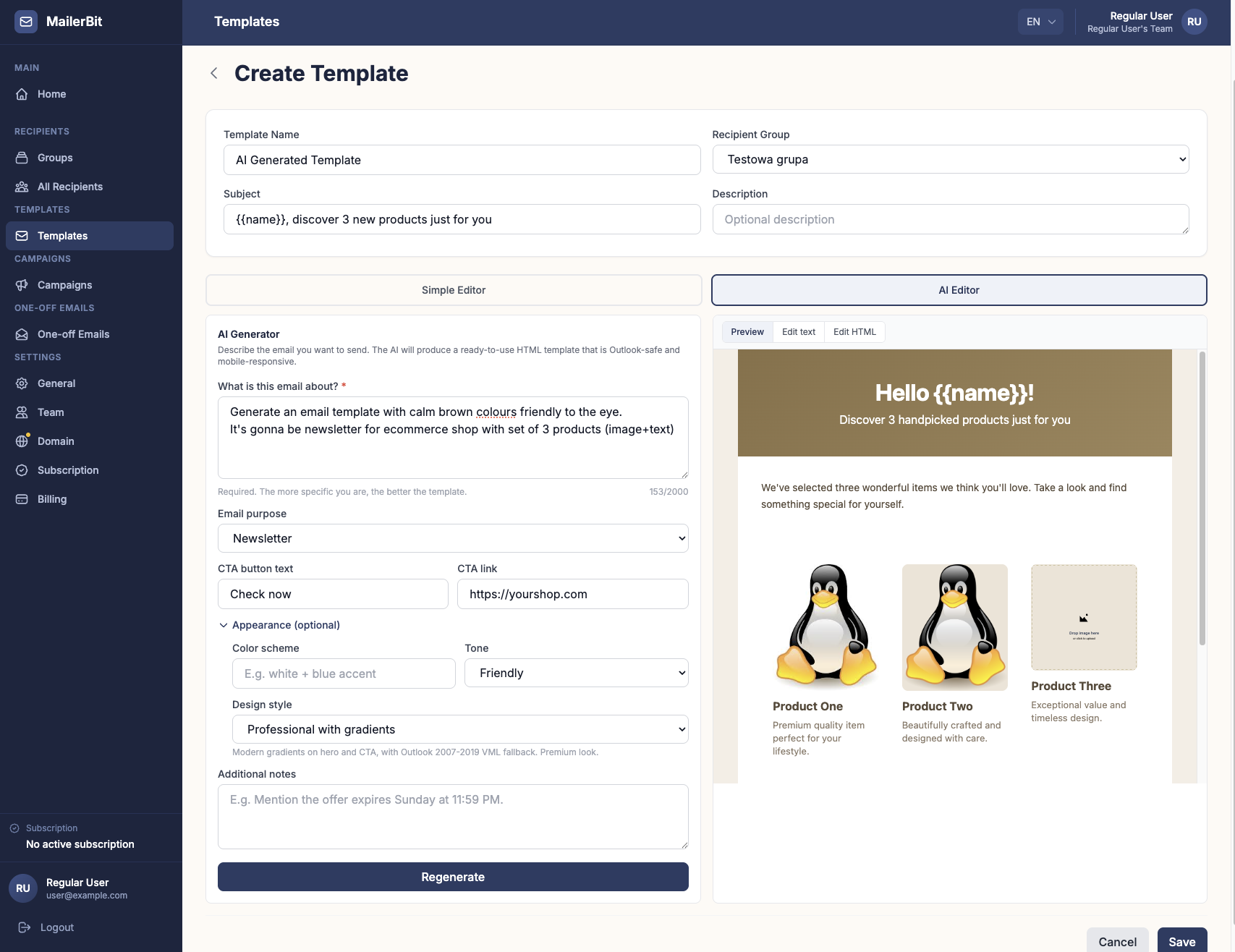
Write a Paragraph, Get a Client Email: MailerBit's AI Editor
Turning a fee notice or payment reminder into a clean, phone-friendly email used to take an afternoon. MailerBit's AI Editor builds it from a short description in seconds.

GDPR and DORA for Client Emails in 2026: A Practical Guide
Payment reminders, statements and account notices carry personal and financial data. What GDPR requires for client emails, when consent is needed and whether DORA applies to you.

Transactional Emails That Get You Paid on Time
Invoices, payment reminders, statements and account notices are the emails clients actually expect. How to write and schedule them so they get read, understood and paid on time.