Parent Communication for Kindergartens: Fees, Meals & Notices

"How much do I owe this month?"
If you run a kindergarten, a nursery or a small private school, you hear that question dozens of times at the start of every month. The fee itself is rarely the problem. The problem is that every family's amount is different: base tuition, meals that depend on how many days the child actually attended, a dance class for one child, swimming for another.
Parents don't need more messages from you. They need one clear message, at a predictable time, that answers their question before they ask it. This guide shows how to set that up: a monthly statement for parents, announcement emails people actually read, and the privacy rules that keep you out of trouble.
What parents actually need from you
Strip away the photo albums and noticeboard posts, and what a parent needs every month is short and specific to their family:
- Their child's own amount, broken down. Tuition, meals calculated from days attended, extra activities. A bare total generates questions; a breakdown answers them.
- The billing period. Which month the tuition covers and which month the meals were counted for (often the previous one).
- The due date. One date, stated plainly, not "by the middle of the month".
- Where to pay. The account number and the exact transfer reference, so your bookkeeping can match payments to children.
- Who to contact if something looks wrong. A name or one email address, not "the office".
Why group chats and messenger apps create chaos
Many kindergartens drift into running parent communication through group chats. That works for "don't forget the costumes tomorrow". For money and individual data, it breaks down quickly:
- You can't post individual amounts in a group. So the group hears "fees are due", and then every parent asks privately how much. You write the individual messages anyway, just less organized.
- Important messages scroll away. The payment notice sits between forty replies about a lost mitten. Parents who muted the group never see it.
- There is no reliable record. When a parent says "nobody told me about the price change", an email in their inbox is easy to point to. A buried chat message is not.
- Privacy leaks are one screenshot away. Anything posted in a group of 60 parents should be treated as public.
Keep group chats for quick logistics. Money, attendance and anything about a specific child belong in a direct, individual email.
The monthly statement: one template, every family's own numbers
The most useful email you can send is a monthly statement: a short, personal summary for each family. You don't write it 120 times. You write it once and fill it with each family's data using merge tags.
Step 1: prepare one row per recipient
Start with the billing spreadsheet you probably already keep. Each row is one parent's email address, each column one piece of data:
parent_name,child_name,group_name,billing_monthmonthly_fee,meal_rate,days_attendedextra_activities(e.g. "English, Swimming") andactivities_costtotal_due,due_date,bank_account,transfer_reference
For a private school the columns change a little (student_name, class_name, tuition_amount, attendance_rate), but the principle is the same: anything that differs between families becomes a column.
Step 2: write the template once
Write the email as you would to a single family, replacing every personal value with a tag:
Subject: {{child_name}}: fees for {{billing_month}}, due {{due_date}}
Dear {{parent_name}},
here is the monthly summary for {{child_name}} ({{group_name}}):
- Tuition: {{monthly_fee}}
- Meals ({{days_attended}} days × {{meal_rate}}): {{days_attended * meal_rate}}
- Extra activities ({{extra_activities}}): {{activities_cost}}
- Total due: {{total_due}}
Please transfer the amount by {{due_date}} to account {{bank_account}}, reference {{transfer_reference}}. If anything looks wrong, just reply to this email.
The subject line alone answers "how much and when" for many parents.
Step 3: send on a fixed day
Many kindergartens bill tuition in advance and meals in arrears, so a natural rhythm is: close the attendance register at month end, update the numbers on the 1st or 2nd, send statements on the 3rd, payment due on the 10th.
Edge cases that cause most questions
- Siblings. Decide whether a family with two children gets one combined statement or one per child. If combined, add columns for the second child and use a separate template for those families, so others don't see empty lines.
- Separated parents. If both should receive the statement, add both addresses as separate rows with the same child data, or with their own share of the fee.
- Mid-month starts, leavers and credits. Calculate pro-rated fees and overpayments in your spreadsheet and add a note column (e.g.
fee_note: "pro-rated from 12 November") instead of editing the template.
Event and announcement emails
Closures, trips, photo day, parent meetings: these also work better as email than chat, because parents need to find them a week later. Keep them effective:
- One topic per email. "Trip to the farm on 21 November" gets read. "November news" with six topics gets skimmed.
- Date and action in the subject line. "Closed Friday 14 Nov (staff training)" beats "Important information".
- Personalize where it helps. "The trip for {{group_name}} leaves at 9:00" is clearer than a timetable for every group.
- Say what the parent has to do. Sign a consent, pack lunch, pay for the ticket by Monday. If nothing, say so.
Tone and frequency
Parents are neither prospects nor debtors. The right tone is a well-organized office: friendly, short, factual. No capital letters, red text or "final notice" in a routine statement. A sensible rhythm:
- Monthly statement on a fixed day.
- One gentle reminder a few days before the due date, only to families who haven't paid. Timing and wording are covered in automated payment reminders that actually get paid.
- Announcements as needed, ideally no more than one or two a week.
- Urgent same-day news by phone or SMS first, with an email for the record.
Privacy: one email, one family
You process children's data, which deserves extra care under GDPR. Done right, email is safer than group chats:
- Never send a statement to several parents at once. No shared CC lists. Each family receives its own email.
- Never show another child's data. No class lists with amounts, no "these children still haven't paid". Preview the template with real data before the first send.
- Keep sensitive data out of routine emails. Allergies and health notes don't belong in a payment statement. If you don't use a column, don't import it.
- Know your legal basis. Fee statements and service announcements follow from your contract with parents; promotional mailings need separate consent.
How MailerBit helps
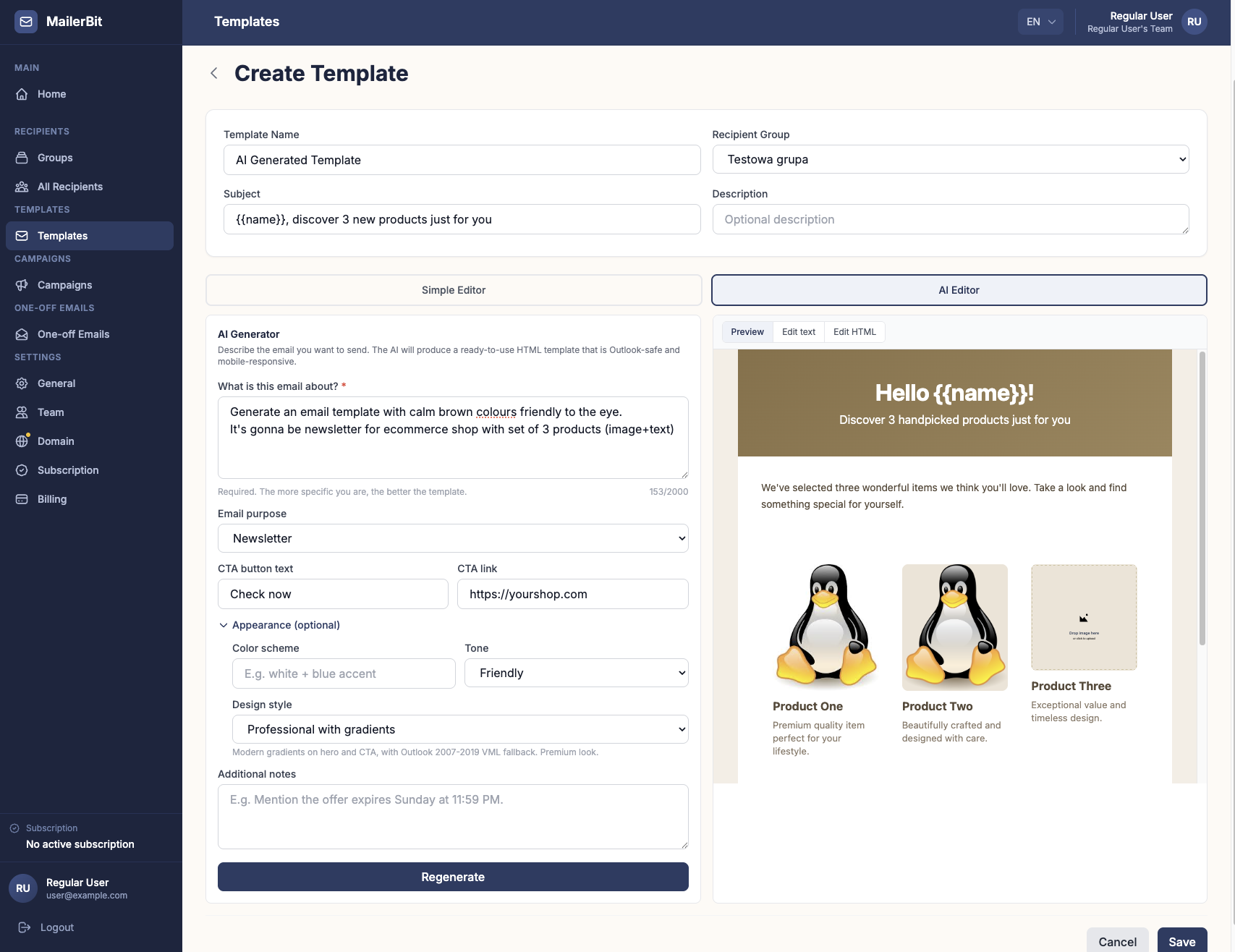
MailerBit is built for recurring emails where every recipient sees their own data. You import your parent list from a CSV, and every column becomes a custom field you can use as a merge tag, with no fixed limit on the number of fields. Fields are typed (text, whole numbers, decimals, dates, files), and the template engine can do one calculation inside a tag, such as {{days_attended * meal_rate}} for the meal cost. The monthly total itself comes from your spreadsheet as {{total_due}}.
Statements run as a recurring campaign: choose the day of the month, the hour and the list, and MailerBit sends on schedule using the current data in your contact list. Upload an updated CSV after closing attendance, and the next run picks up the new numbers. The campaign's Preview step shows each recipient's email rendered with their real data, messages go out from your own domain, and each family gets its own individual email. See example templates on the kindergartens and private schools pages.
Make the 3rd of the month quiet
The goal isn't more email. It's one clear, correct statement for each family at a predictable time, instead of answering the same question 120 times. Prepare your columns, write the template once, preview it with real data and schedule it. Start your 7-day free MailerBit trial and set up your first parent statement in an afternoon.