Email Template Editor — Write a Paragraph, Get a Newsletter
Stop wrestling with email design. Describe what you want to say in plain language, pick a look, and MailerBit builds a professional newsletter that opens perfectly on every phone and every inbox. No designer, no developer, no agency required.
The Email Design Bottleneck, Solved
Every small business has the same story. You know what you want to say to your customers. The list is ready. The schedule is on the calendar. What's missing is the half-day it takes to make the email actually look like something a real company would send — on a phone, on a desktop, in every inbox your contacts use.
MailerBit removes that bottleneck. You describe the email you want. Pick a style. Click Generate. A few seconds later you have a polished, ready-to-send newsletter, invoice reminder, fee notice, or announcement — written specifically for your business. No designer, no developer, no agency. The half-day disappears.
Two Ways to Write. Both Painless.
The AI editor is the fastest path from idea to send. You answer a few short questions in plain language — what the email is about, what it should achieve, whether there's a button you want people to click, what mood you're going for. You hit Generate and within seconds the right side of the screen shows your finished newsletter, complete with subject line, headline, body copy, call-to-action button, footer, and an unsubscribe link.
The simple editor is the familiar text-document feel for moments when you want total control over every word. Bold, italic, underline, strikethrough, lists, headings, links — the basics you already know from your word processor. Switch between the two editors at any time on the same template. They live side-by-side.
Personal to Every Recipient, Without Lifting a Finger
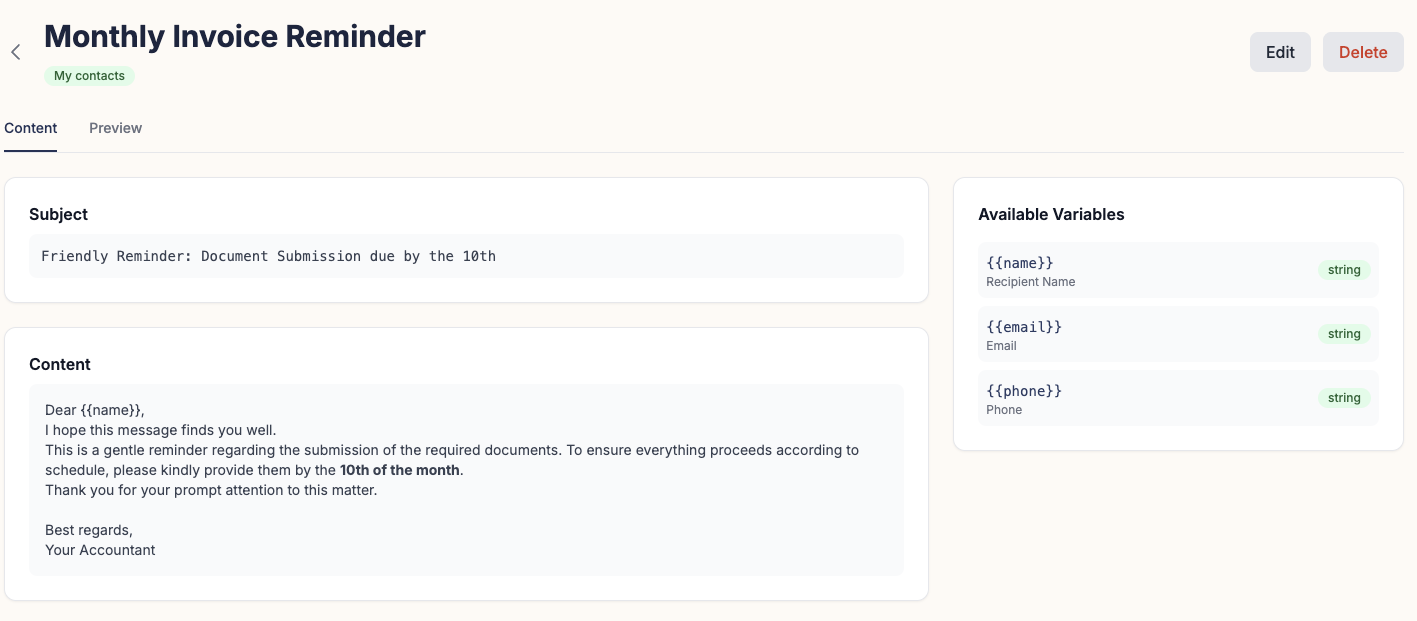
This is where MailerBit pulls ahead of generic newsletter tools. Each of your contacts can carry the data your business actually cares about — their balance, their invoice amount, their child's name, their property address, their renewal date, anything. When you write the template, you drop in placeholders wherever you want their personal data to appear. When the email sends, MailerBit fills each placeholder with that contact's real value.
The result: one template generates fifty or fifty thousand emails, each one individually written for the person reading it. Your accounting client sees their exact tax figure. Your tenant sees their rent for this month. Your investor sees their portfolio value. Your student's parent sees this month's attendance. No spreadsheets to merge, no manual copy-pasting, no risk of sending the wrong number to the wrong person.
Four Looks. Pick the One That Fits Your Brand.
Design direction isn't a guess. The AI editor gives you four professional styles to choose from — each engineered for a different kind of message:
Default — Clean & Approachable
Solid colours, generous whitespace, one accent colour. The safest, most universally pleasing look. Great for monthly informational updates and customer communications.
Professional with Gradients
Modern, premium feel with a subtle gradient header and accent button. Great for product launches, real estate fund reports, and SaaS announcements that need to feel current.
Minimal — Personal Note Feel
Black on white, no accents, hand-typed transactional vibe. Reads like a personal message from a serious brand. Great for payment confirmations, founder letters, and high-trust messages.
Bold — Promo Energy
High contrast, large typography, saturated accent colour. Great for sales, flash promotions, event invitations — messages that need to grab attention in the inbox preview.
Layer your own brand colours on top of any preset. The colours drive the palette; the preset drives the layout and mood. Together you get a newsletter that genuinely belongs to your brand — not the same template every other small business is sending.
Drop In Your Images. No Photoshop Required.
When your email needs an image — a hero photo, a product shot, your team's logo — you don't need to fight a separate tool. Wherever an image belongs, MailerBit shows you a friendly "Drop image here" box. You drag a picture from your computer. It uploads instantly, scales correctly, and replaces the placeholder. Done.
Want to swap it later? Click the picture, pick a different one. Want to remove it? Hover, click the small × in the corner. MailerBit handles where the images live, how they load for your recipients, and how they're cleaned up when you no longer need them. You drag and send. Everything else is automatic.
Edit Anything Before You Send
The AI gives you a strong starting point, not a take-it-or-leave-it final version. After it generates your email, you can tweak the headline, soften a sentence, fix a date, change a price, swap an image — everything stays in sync. What you see in the preview is exactly what your recipients will see when they open the message in their inbox. No surprises, no last-minute design glitches, no "why does it look broken in Outlook?"
Looks Right on Every Screen, Every Time
Every email MailerBit produces is built to look identical whether your customer opens it on an iPhone, a desktop computer, a tablet, in Gmail, in Outlook, or in the company email app at the office. You never have to think about it. We've spent years making sure email designs survive the journey from your screen to your customer's, on every device and every email program they might use. The professional polish is just there, every time you send.
Built for Real Businesses, Used by Real Ones
Accounting Firms
Monthly tax notifications — VAT, PIT, social insurance — each client receives their own figures, their own bank transfer details, and their own payment deadline. A half-day of manual emails becomes a 30-second check that the campaign ran.
Language Schools & Tutoring
Term-start announcements, course offers, monthly invoices with each student's actual attendance and tuition. Parents open emails that look like they came from a serious school, not a Gmail draft.
Property Managers
Monthly rent reminders, maintenance notices, community updates. Every tenant sees their own apartment, their own rent, and the right bank account — without spreadsheet juggling or copy-pasting.
Newsletter Publishers
Weekly editorial issues. Writers report saving roughly three hours per issue compared to their previous tool — time they spend on the actual writing instead of formatting.
Kindergartens & Private Schools
Term communications, event invitations, fundraising appeals. The kind of email parents actually open because it doesn't look like it was thrown together in five minutes.
Investment & Wealth Platforms
Quarterly market commentary and personalised portfolio updates. Each investor sees their exact position, their return, and consistent professional branding across every message.
Send your first professional newsletter today.
Free to start, no credit card. Write a paragraph about what you want to send, pick a style, drag in your images, and have it in front of your customers within minutes.
Try MailerBit Free