Write a Paragraph, Send a Newsletter: How MailerBit's AI Email Editor Works
The Slowest Part of Email Marketing Isn't the Writing
You already know what you want to say to your customers. The list is ready. The schedule is on the calendar. The offer, the update, the announcement — the message has been ready for weeks in your head. What's holding you back is the half-day it takes to turn that message into an email that actually looks like it came from a serious business, opens correctly on a phone, and doesn't end up filtered into spam.
That's the bottleneck most marketing emails get stuck at. The list is fine. The copy is fine. The schedule is fine. The thing that breaks is the moment you have to make it look like an email.
The AI Editor in MailerBit was built to remove that step entirely. You describe the email. The editor builds it. You review, tweak if needed, and send. The half-day becomes a few minutes.
Two Ways to Write, Both Painless
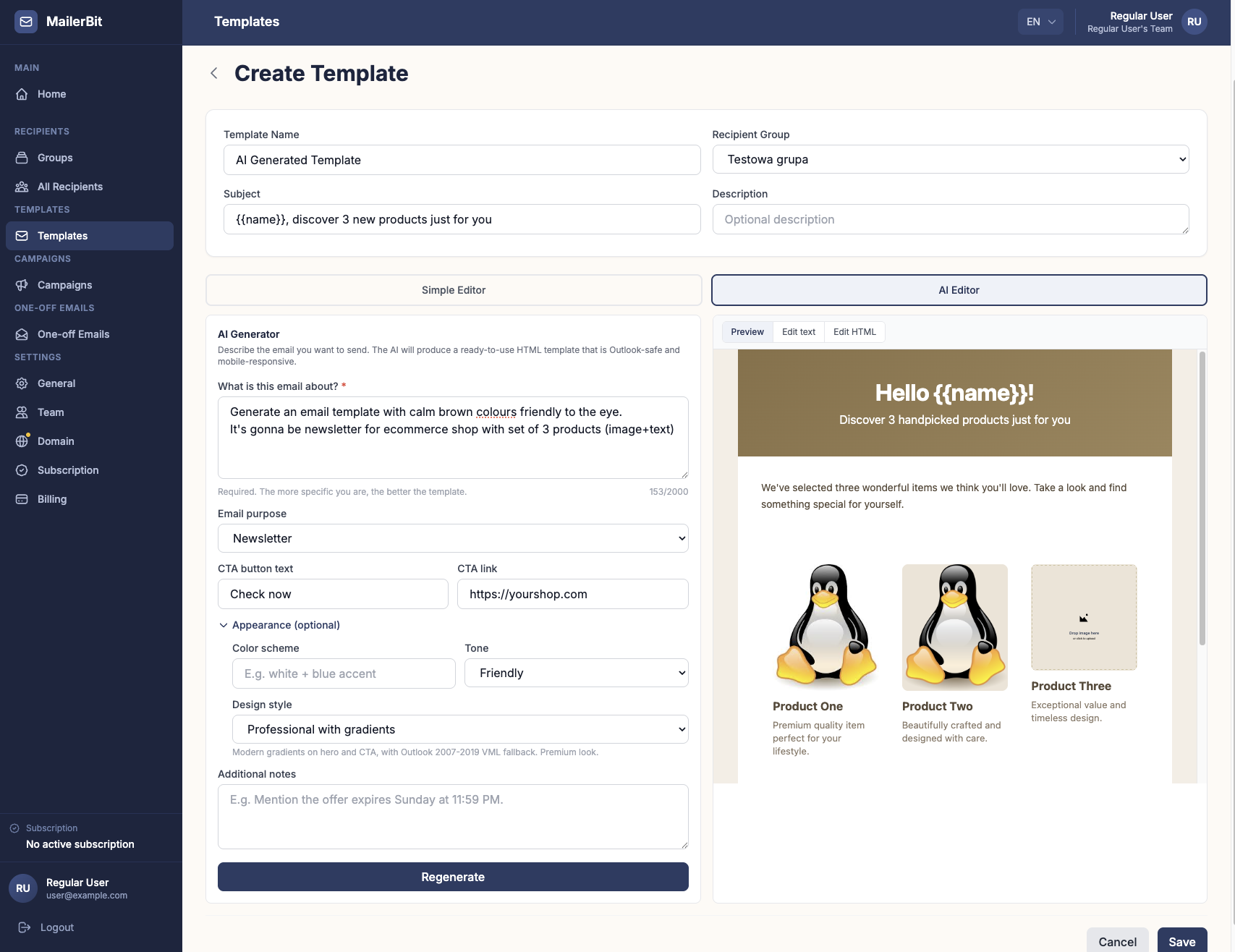
Open any template in MailerBit and you'll see a simple toggle between the Simple Editor and the new AI Editor.
The Simple Editor is the familiar text-document experience: type, format with bold, italic, underline, strikethrough, drop in headings and lists, and you've got a clean email. Perfect when you know exactly what you want to write.
The AI Editor is the fast lane. On the left, a short, plain-language form asks the kind of questions an experienced email marketer would ask before drafting copy: what's the email about, what's it meant to achieve, is there a button you want people to click, what tone and colours fit your brand? Fill in what you know — even bare minimum is enough — and click Generate. A few seconds later, the right side of the screen shows a finished newsletter, with subject line, headline, body, button, footer, and unsubscribe link, ready to review.
One Email, Written for Each Reader
Generic newsletters don't perform. Customers can tell when they're getting the same mass blast as ten thousand other people. What actually drives action is a message that speaks to the reader's specific situation — their amount due, their balance, their renewal date, their child's name, the unit number on their property.
MailerBit handles this without any spreadsheet juggling on your side. When you build the template, you drop personal fields wherever individual data should appear. When the email sends, those fields are quietly replaced with the right value for each recipient. One template can generate fifty or fifty thousand emails — each one written individually for the person reading it.
There's no copy-paste step. No risk of sending the wrong number to the wrong person. Just one campaign that feels personal at any scale.
Four Design Styles, Picked in Seconds
You don't need a design background to pick a look that suits your business. The AI Editor gives you four professional styles to choose from, each tuned for a different kind of message:
- Default — clean, minimal, generous whitespace, one accent colour. The safest choice, looks good in every email client. Great for everyday newsletters and customer updates.
- Professional with Gradients — modern, premium feel with a subtle gradient header and accent button. Great for product launches and announcements that need to feel current.
- Minimal — black on white, no accents, transactional feel. Reads like a personal note from a serious brand. Great for high-trust messages.
- Bold — high contrast, large typography, strong accent colour. Great for promos, sales, and event invitations that need to grab attention in the inbox preview.
Layer your own brand colours on top. The result is a newsletter that genuinely belongs to your brand — not the same generic template every other small business sends.
Drop in Your Images. No Graphic Tool Needed.
Wherever your email needs a picture — a hero photo, a product shot, your logo — MailerBit shows you a friendly "Drop image here" box exactly where the image should sit. Drag a picture from your computer onto it. It uploads instantly, scales correctly, and replaces the placeholder. Done.
Want to swap the image later? Click it and pick a different one. Want to remove it? Hover, click the small × in the corner. No Photoshop, no Canva, no waiting on a designer to crop something for you.
Edit Anything Before You Send
The AI gives you a strong first draft, not a take-it-or-leave-it final version. After it generates the email, every part of it is editable. Soften the headline. Change a date. Adjust a price. Swap an image. Add a sentence the AI didn't include.
What you see in the preview is what your customer will see in their inbox. No surprises, no last-minute layout glitches, no awkward formatting on a phone screen.
Looks Right on Every Device, Every Time
Every email MailerBit produces looks identical whether your customer opens it on a phone, a tablet, a laptop, or in their company email program at the office. You don't have to think about it. Behind the scenes we've spent years making sure email designs survive the journey from your screen to your customer's, on every device and every email program they might use.
The professional polish is simply there — every send, every time.
Try It on the Email You've Been Putting Off
The AI Editor is live for every active subscription and every free trial. Open the templates section, switch to AI Editor, and write a paragraph about that email you've been meaning to send for weeks. Pick a style. Click Generate. Drop in your images. Tweak the headline if you want. Hit save and send.
That's how the next newsletter goes out. And the one after that. The half-day you used to spend on this becomes a half-day you spend on the part of marketing that actually moves your business forward.
Start sending your first AI-generated newsletter free — no credit card, no agency briefing, no half-day required.