Set It Once. It Runs Forever.
The emails you send every month — newsletters, invoice reminders, rent notices, fee summaries — shouldn't need a calendar reminder for you. Schedule them once in MailerBit and they fire on their own with fresh data every time.
Why You Want This
Every small business has at least one email it sends on the same day every month — the rent reminder, the VAT notice, the monthly newsletter, the renewal nudge. Done by hand, that's an hour or two of work per send, multiplied by however many recipients you have, multiplied by twelve months a year. By the time you've spell-checked everything, somebody's name is wrong.
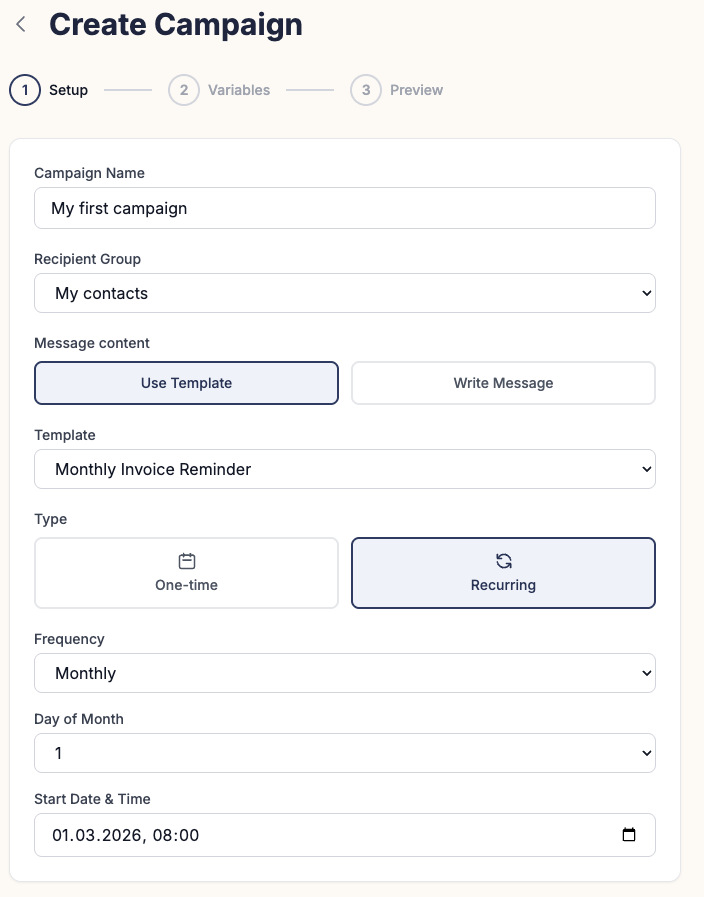
Recurring campaigns in MailerBit replace that workflow entirely. You build the template once with merge tags for the per-recipient bits — amount due, account number, child's name, attendance percentage, whatever your business actually tracks. You set the schedule once. After that the campaign runs on its own at the moment you chose, pulling current data from your contact list each time, generating individually personalised emails, and sending them while you sleep.
Combined with unlimited custom fields, every recurring email is genuinely tailored to the recipient. Not just "Hi {{name}}" — actual numbers, dates, account details, the things they need to see to act on the email.
Four Steps. Then Hands Off.
Build the template once
Use the AI editor for a one-paragraph brief, or the simple text editor for full control. Drop in merge tags like {{amount_due}} or {{due_date}}. Those become real values when the email is sent.
Pick when it runs
The 1st of every month, the 15th, the last business day, the 20th — whatever pattern matches your business cycle. Set the hour and the timezone. Done.
Point it at your contact list
Assign the campaign to a list or segment. Contacts you add later are automatically included in the next run — no need to remember to update anything.
It fires while you sleep
On the scheduled date, MailerBit pulls the freshest data, personalises every email individually, and sends. You get a clean report with delivery, opens, and any errors — but unless something needs attention, you don't have to touch the campaign for months.
Who Saves the Most Time
Industries we hear about most — the workflows where recurring campaigns replace the most manual work.
Accounting Firms
Monthly VAT and PIT notifications on the 20th. Each client gets their exact tax figure, bank transfer details, and payment deadline pulled from custom fields. What used to be a half-day of manual emails becomes a 30-second check that the campaign ran.
Language Schools & Tutoring
Monthly invoices reflecting actual attendance. Each student receives their attendance rate, current tuition, and a payment link — updated automatically every send because MailerBit pulls fresh data from the contact list.
Property Managers
Rent reminders on the 1st of every month. Each tenant gets their specific rent amount, due date, bank account, and any applicable charges. No spreadsheet juggling, no copy-paste, no missed tenants.
Newsletters & Content Businesses
Weekly or monthly editorial newsletters that go out automatically every Tuesday at 10:00. New subscribers added during the week are automatically included in the next send — no manual list management.
Kindergartens & Private Schools
Monthly fee notices personalised per child. Each parent receives their child's name, the month's fee, payment account, and any optional add-ons (meals, trips, after-school care). One template covers every variation.
Investment & Wealth Platforms
Monthly portfolio summaries for clients. Current valuation, month-over-month change, and personalised next steps — pulled from custom fields and recalculated for every recipient at send time using built-in template math.
Cancel the calendar reminder.
Set up your first recurring campaign in minutes. The interactive demo lets you walk through the full flow without signing up — no account, no card.